

<?xml version="1.0" encoding="UTF-8"?>
<rss version="2.0"
	xmlns:content="http://purl.org/rss/1.0/modules/content/"
	xmlns:wfw="http://wellformedweb.org/CommentAPI/"
	xmlns:dc="http://purl.org/dc/elements/1.1/"
	xmlns:atom="http://www.w3.org/2005/Atom"
	xmlns:sy="http://purl.org/rss/1.0/modules/syndication/"
	>

<channel>
	<title>Browsera Blog</title>
	<atom:link href="http://blog.browsera.com/?feed=rss2" rel="self" type="application/rss+xml" />
	<link>http://blog.browsera.com</link>
	<description>Cross-Browser Site Compatibility</description>
	<pubDate>Mon, 09 Aug 2010 16:29:49 +0000</pubDate>
	<generator>http://wordpress.org/?v=2.7.1</generator>
	<language>en</language>
	<sy:updatePeriod>hourly</sy:updatePeriod>
	<sy:updateFrequency>1</sy:updateFrequency>
			<item>
		<title>Chrome 5 and Firefox 3.6.3 Browser Support</title>
		<link>http://blog.browsera.com/?p=116</link>
		<comments>http://blog.browsera.com/?p=116#comments</comments>
		<pubDate>Mon, 19 Jul 2010 16:29:49 +0000</pubDate>
		<dc:creator>admin</dc:creator>
		
		<category><![CDATA[Cross-Browser Bug Fixes]]></category>

		<guid isPermaLink="false">http://blog.browsera.com/?p=116</guid>
		<description><![CDATA[We&#8217;ve added Chrome 5 and Firefox 3.6.3 browser support to our matrix.  According to NetMarketshare, the current browser share breakdown looks like this:


Microsoft Internet Explorer 8.0
26.87%


Microsoft Internet Explorer 6.0
16.97%


Firefox 3.6
16.15%


Microsoft Internet Explorer 7.0
11.43%


Chrome 5.0
6.48%


Chrome 5 has really surged these past few months, as Google has really put a lot of effort into promoting it [...]]]></description>
			<content:encoded><![CDATA[<p>We&#8217;ve added Chrome 5 and Firefox 3.6.3 browser support to our matrix.  According to <a href="http://marketshare.hitslink.com/browser-market-share.aspx?qprid=2">NetMarketshare</a>, the current browser share breakdown looks like this:</p>
<table border="0">
<tbody>
<tr>
<td>Microsoft Internet Explorer 8.0</td>
<td>26.87%</td>
</tr>
<tr>
<td>Microsoft Internet Explorer 6.0</td>
<td>16.97%</td>
</tr>
<tr>
<td>Firefox 3.6</td>
<td>16.15%</td>
</tr>
<tr>
<td>Microsoft Internet Explorer 7.0</td>
<td>11.43%</td>
</tr>
<tr>
<td>Chrome 5.0</td>
<td>6.48%</td>
</tr>
<tr></tr>
</tbody>
</table>
<p>Chrome 5 has really surged these past few months, as Google has really put a lot of effort into promoting it on their homepage as well as on Youtube, where IE6 is now officially unsupported.  </p>
<p>We&#8217;ll continue to track browser market shares and adjust our testing matrix accordingly.  We are considering retiring very low share browsers such as Firefox 2 and Safari 3.  </p>
]]></content:encoded>
			<wfw:commentRss>http://blog.browsera.com/?feed=rss2&amp;p=116</wfw:commentRss>
		</item>
		<item>
		<title>Now Offering non-subscription &#8220;Project Plan&#8221;</title>
		<link>http://blog.browsera.com/?p=112</link>
		<comments>http://blog.browsera.com/?p=112#comments</comments>
		<pubDate>Fri, 15 Jan 2010 18:36:01 +0000</pubDate>
		<dc:creator>browsera</dc:creator>
		
		<category><![CDATA[Cross-Browser Bug Fixes]]></category>

		<guid isPermaLink="false">http://blog.browsera.com/?p=112</guid>
		<description><![CDATA[We&#8217;ve heard your feedback!  We now offer a non-recurring plan, the Project Plan.  For those of you who would only need to use Browsera for a short period of time when you make website revisions, we now offer a plan with a one-time charge of $39.  This will give you access to Browsera for 14 [...]]]></description>
			<content:encoded><![CDATA[<p>We&#8217;ve heard your feedback!  We now offer a non-recurring plan, the Project Plan.  For those of you who would only need to use Browsera for a short period of time when you make website revisions, we now offer a plan with a one-time charge of $39.  This will give you access to Browsera for 14 continuous days.  At the end of the period, you won&#8217;t be charged again until you renew or purchase a subscription.  Check out the <a href="http://www.browsera.com/plans">new plan details</a>.</p>
]]></content:encoded>
			<wfw:commentRss>http://blog.browsera.com/?feed=rss2&amp;p=112</wfw:commentRss>
		</item>
		<item>
		<title>Experiencing testing delays</title>
		<link>http://blog.browsera.com/?p=109</link>
		<comments>http://blog.browsera.com/?p=109#comments</comments>
		<pubDate>Thu, 15 Oct 2009 07:11:42 +0000</pubDate>
		<dc:creator>admin</dc:creator>
		
		<category><![CDATA[Cross-Browser Bug Fixes]]></category>

		<guid isPermaLink="false">http://blog.browsera.com/?p=109</guid>
		<description><![CDATA[Hey there everyone, we&#8217;ve been mentioned on Twitter by @smashing_mag, and it&#8217;s been retweeted numerous times!  Thanks for all the support and checking us out.  Unfortunately, our servers weren&#8217;t quite prepared for all of the testing requests, so we apologize for the delay.  We&#8217;re working on adding more capacity so we can [...]]]></description>
			<content:encoded><![CDATA[<p>Hey there everyone, we&#8217;ve been mentioned on Twitter by @smashing_mag, and it&#8217;s been retweeted numerous times!  Thanks for all the support and checking us out.  Unfortunately, our servers weren&#8217;t quite prepared for all of the testing requests, so we apologize for the delay.  We&#8217;re working on adding more capacity so we can deliver a better and faster turn around time.  </p>
<p>Currently, free account tests will not be processed for up to 24 hours, however, we are doing everything possible to bring that time down.  Apologies again, and happy testing,</p>
<p>Browsera<br />
<a href="http://twitter.com/browsera">Follow us on Twitter</a></p>
]]></content:encoded>
			<wfw:commentRss>http://blog.browsera.com/?feed=rss2&amp;p=109</wfw:commentRss>
		</item>
		<item>
		<title>Mysterious margins in IE can be caused by document whitespace</title>
		<link>http://blog.browsera.com/?p=103</link>
		<comments>http://blog.browsera.com/?p=103#comments</comments>
		<pubDate>Wed, 14 Oct 2009 02:30:10 +0000</pubDate>
		<dc:creator>admin</dc:creator>
		
		<category><![CDATA[Cross-Browser Bug Fixes]]></category>

		<guid isPermaLink="false">http://blog.browsera.com/?p=103</guid>
		<description><![CDATA[Images not lining up right in IE?  If it appears that there is a mysterious margin in IE even when your margins are set to &#8220;0&#8243;, you&#8217;re probably affected by this.  Internet Explorer treats whitespace as significant inside of anchors.
Consider the following example:

&#60;div style="border: 1px solid black; width: 200px;"&#62;
    &#60;p style="float: left; [...]]]></description>
			<content:encoded><![CDATA[<p>Images not lining up right in IE?  If it appears that there is a mysterious margin in IE even when your margins are set to &#8220;0&#8243;, you&#8217;re probably affected by this.  Internet Explorer treats whitespace as significant inside of anchors.</p>
<p>Consider the following example:</p>
<pre>
&lt;div style="border: 1px solid black; width: 200px;"&gt;
    &lt;p style="float: left; margin: 0;"&gt;This is some text&lt;/p&gt;
    &lt;a style="float: right; " href="#"&gt;
        &lt;img src="x.png" /&gt;
    &lt;/a&gt;
    &lt;div style="clear: both;"&gt;&lt;/div&gt;
&lt;/div&gt;
</pre>
<p>And the resulting rendering in Internet Explorer 7 and Firefox</p>
<p><img class="alignnone size-full wp-image-104" title="image_margin" src="http://blog.browsera.com/wp-content/uploads/2009/10/image_margin.png" alt="image_margin" width="223" height="80" /></p>
<p>If the whitespace surrounding the &lt;img&gt; element is removed, IE places the item in the same place as Firefox!</p>
<p>So, next time you find a mysterious extra margin showing up in IE, remember this tip.</p>
<p>P.S. Sometimes it is undesirable to remove the whitespace formatting.  Another workaround is to apply the style &#8220;font-size: 0px&#8221; to the anchor element.</p>
]]></content:encoded>
			<wfw:commentRss>http://blog.browsera.com/?feed=rss2&amp;p=103</wfw:commentRss>
		</item>
		<item>
		<title>XBDiff is now Browsera!</title>
		<link>http://blog.browsera.com/?p=102</link>
		<comments>http://blog.browsera.com/?p=102#comments</comments>
		<pubDate>Fri, 17 Jul 2009 22:27:25 +0000</pubDate>
		<dc:creator>browsera</dc:creator>
		
		<category><![CDATA[Cross-Browser Bug Fixes]]></category>

		<category><![CDATA[rename]]></category>

		<category><![CDATA[xbdiff]]></category>

		<guid isPermaLink="false">http://blog.browsera.com/?p=102</guid>
		<description><![CDATA[We&#8217;re happy to announce that XBDiff is now called Browsera.  XBDiff was short for &#8216;Cross-Browser Differences&#8217;, and was the working name for the initial project.  The new name, Browsera, signifies the new Browser Era of applications.  We know that developing applications for web browsers is hard, and we believe that any tools [...]]]></description>
			<content:encoded><![CDATA[<p>We&#8217;re happy to announce that XBDiff is now called Browsera.  XBDiff was short for &#8216;Cross-Browser Differences&#8217;, and was the working name for the initial project.  The new name, Browsera, signifies the new Browser Era of applications.  We know that developing applications for web browsers is hard, and we believe that any tools we can build to make it easier will benefit everyone.  So, let us know if you have suggestions or ideas.</p>
]]></content:encoded>
			<wfw:commentRss>http://blog.browsera.com/?feed=rss2&amp;p=102</wfw:commentRss>
		</item>
		<item>
		<title>IE6 Image Size Causes Float Wrap - Livekick Homepage</title>
		<link>http://blog.browsera.com/?p=75</link>
		<comments>http://blog.browsera.com/?p=75#comments</comments>
		<pubDate>Tue, 16 Jun 2009 03:01:49 +0000</pubDate>
		<dc:creator>browsera</dc:creator>
		
		<category><![CDATA[Cross-Browser Bug Fixes]]></category>

		<category><![CDATA[float wrap]]></category>

		<category><![CDATA[ie6]]></category>

		<category><![CDATA[img width]]></category>

		<category><![CDATA[livekick]]></category>

		<guid isPermaLink="false">http://blog.xbdiff.com/?p=75</guid>
		<description><![CDATA[
The Livekick homepage suffers from a common problem in IE6.  Floats are getting wrapped incorrectly due to IE not clipping the image to  its containers width.   IE6 renders the Aerosmith thumbnail as its entire width, even though that causes the containing div, which has width=129px, to expand to fit it.   The code looks like this
&#60;div [...]]]></description>
			<content:encoded><![CDATA[<p style="text-align: center;"><a href="http://www.browsera.com/web_pages/7188-livekick-concert-tickets-search-engine"><img class="aligncenter size-full wp-image-74" title="livekick_home" src="http://blog.xbdiff.com/wp-content/uploads/2009/06/livekick_home.jpg" alt="livekick_home" width="595" height="169" /></a></p>
<p>The<a href="http://livekick.com"> Livekick homepage</a> suffers from a common problem in IE6.  Floats are getting wrapped incorrectly due to<a href="http://www.browsera.com/web_pages/7188-livekick-concert-tickets-search-engine"> IE not clipping the image to  its containers width</a>.   IE6 renders the Aerosmith thumbnail as its entire width, even though that causes the containing div, which has width=129px, to expand to fit it.   The code looks like this</p>
<p>&lt;div id=&#8217;divHotToursTiles&#8217;&gt;</p>
<p>&lt;div class=&#8217;tile&#8217;&gt;SNIP&lt;/div&gt;</p>
<p>&lt;div class=&#8217;tile&#8217; style=&#8217;width: 129px&#8217;&gt;</p>
<p>&lt;div&gt;</p>
<p>&lt;a&gt;&lt;img&gt;&lt;/img&gt;&lt;/a&gt;</p>
<p>&lt;/div&gt;</p>
<p>&lt;div class=&#8217;tile&#8217;&gt;SNIP&lt;/div&gt;</p>
<p>&lt;/div&gt;</p>
<p>The fix for this is relatively simple.  Just add &#8220;overflow: hidden;&#8221; to the tile class to prevent IE6 from forcing the image&#8217;s parent div to expand.</p>
]]></content:encoded>
			<wfw:commentRss>http://blog.browsera.com/?feed=rss2&amp;p=75</wfw:commentRss>
		</item>
		<item>
		<title>Missing Close Tags Cause Undefined Layout Behavior - Techcrunch Advertising</title>
		<link>http://blog.browsera.com/?p=67</link>
		<comments>http://blog.browsera.com/?p=67#comments</comments>
		<pubDate>Tue, 16 Jun 2009 01:19:16 +0000</pubDate>
		<dc:creator>browsera</dc:creator>
		
		<category><![CDATA[Cross-Browser Bug Fixes]]></category>

		<category><![CDATA[closing tags]]></category>

		<category><![CDATA[ie7 wrap]]></category>

		<category><![CDATA[lost revenue]]></category>

		<category><![CDATA[techcrunch]]></category>

		<guid isPermaLink="false">http://blog.xbdiff.com/?p=67</guid>
		<description><![CDATA[
It seems that even our friends over at TechCrunch have some serious layout problems, even in IE7.  In this situation, the ad sidebar is wrapped way down below where they should be in IE7 (but are in the correct location in IE6).  Techcrunch gets 5.5 million visitors a month, and while a lot of their [...]]]></description>
			<content:encoded><![CDATA[<p style="text-align: center;"><a href="http://www.browsera.com/web_pages/7167-advertise"><img class="aligncenter size-large wp-image-68" title="techcrunch_advertise_1" src="http://blog.xbdiff.com/wp-content/uploads/2009/06/techcrunch_advertise_1-1024x303.jpg" alt="techcrunch_advertise_1" width="524" height="155" /></a></p>
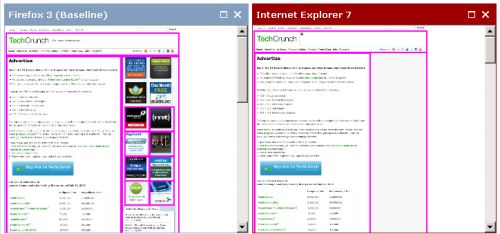
<p style="text-align: left;">It seems that even our friends over at <a href="http://www.browsera.com/web_pages/7167-advertise">TechCrunch </a>have some serious layout problems, even in IE7.  In this situation, the<a href="http://www.browsera.com/web_pages/7167-advertise"> ad sidebar is wrapped way down below</a> where they should be in IE7 (but are in the correct location in IE6).  Techcrunch gets 5.5 million visitors a month, and while a lot of their traffic is Firefox and Safari, at least some of those visitors are using IE7.  I&#8217;d even go farther and hypothesize that among customers who run ads on TechCrunch, IE is a higher percentage.</p>
<p style="text-align: left;">So, if you were an advertiser considering placing an ad at TechCrunch using IE7 and saw the buggy miserable ad placement on the page, you might think twice about the value of buying that ad.  And, all those visitors using IE7 will probably not even see the ads unless they happen to scroll down past the trackbacks.</p>
<p style="text-align: left;">The fix in this case is simple.  The &lt;div&gt; tags arent close properly in &lt;div id=&#8217;col1&#8242;&gt; and this leads to undefined behavior across browsers, especially when dealing with floats.  Close the divs properly and the problem goes away.  There are a few <a href="http://www.browsera.com/tests/449-techcrunch-com">other bugs on TechCrunch</a> you can check out, of similar magnitude.</p>
<p style="text-align: left;">This is the kind of bug that can directly impact revenue, so it&#8217;s a good idea to protect yourself by testing your site in <a href="http://www.browsera.com">Browsera</a>.</p>
]]></content:encoded>
			<wfw:commentRss>http://blog.browsera.com/?feed=rss2&amp;p=67</wfw:commentRss>
		</item>
		<item>
		<title>Line Wrap Difference Between IE and Firefox - Building43 Blog</title>
		<link>http://blog.browsera.com/?p=65</link>
		<comments>http://blog.browsera.com/?p=65#comments</comments>
		<pubDate>Mon, 15 Jun 2009 23:15:27 +0000</pubDate>
		<dc:creator>browsera</dc:creator>
		
		<category><![CDATA[Cross-Browser Bug Fixes]]></category>

		<category><![CDATA[building43]]></category>

		<category><![CDATA[ff vs ie]]></category>

		<category><![CDATA[unresolved]]></category>

		<guid isPermaLink="false">http://blog.xbdiff.com/?p=65</guid>
		<description><![CDATA[
An interesting difference was detected on the Building 43 Blog between IE and Firefox.   I spent some time trying to figure out which of the two was the &#8220;correct&#8221; rendering based on their CSS.  The relevant code looks like this:
&#60;td&#62;
&#60;div class=&#8217;js-singleCommentMenu&#8217; style=&#8217;float: left;&#8217;&#62;[More button]&#60;/div&#62;
&#60;div class=&#8217;js-singleCommentKarma&#8217; style=&#8217;float: left;&#62;
&#60;span&#62;Like this comment?&#60;/span&#62;
&#60;span style=&#8217;display: none;&#8217;&#62;Score: 1 by 1 vote&#60;/span&#62;
&#60;/div&#62;
&#60;/td&#62;
In [...]]]></description>
			<content:encoded><![CDATA[<p style="text-align: center;"><a href="http://www.browsera.com/web_pages/7150-the-new-economics-of-entrepreneurship"><img class="aligncenter size-full wp-image-64" title="building43_comments" src="http://blog.xbdiff.com/wp-content/uploads/2009/06/building43_comments.jpg" alt="building43_comments" width="622" height="171" /></a></p>
<p>An<a href="http://www.browsera.com/web_pages/7150-the-new-economics-of-entrepreneurship"> interesting difference</a> was detected on the <a href="http://www.building43.com/blogs/2009/06/11/guy-kawasaki/">Building 43 Blog</a> between IE and Firefox.   I spent some time trying to figure out which of the two was the &#8220;correct&#8221; rendering based on their CSS.  The relevant code looks like this:</p>
<p>&lt;td&gt;</p>
<p>&lt;div class=&#8217;js-singleCommentMenu&#8217; style=&#8217;float: left;&#8217;&gt;[More button]&lt;/div&gt;</p>
<p>&lt;div class=&#8217;js-singleCommentKarma&#8217; style=&#8217;float: left;&gt;</p>
<p>&lt;span&gt;Like this comment?&lt;/span&gt;</p>
<p>&lt;span style=&#8217;display: none;&#8217;&gt;Score: 1 by 1 vote&lt;/span&gt;</p>
<p>&lt;/div&gt;</p>
<p>&lt;/td&gt;</p>
<p>In javascript, the score span is changed to &#8220;display: inline&#8221; so that it appears.  What could be happening is that in Firefox, the script runs before the layout is complete, and firefox tries to float the div with both spans visible, forcing it to the next line.  In IE, the script doesnt change the display until after the first span is placed to the right of the More button because it fits, and then the Score text is added.   Any other theories on this bug?</p>
]]></content:encoded>
			<wfw:commentRss>http://blog.browsera.com/?feed=rss2&amp;p=65</wfw:commentRss>
		</item>
		<item>
		<title>Floats Don&#8217;t Shrink To Fit in Firefox 2</title>
		<link>http://blog.browsera.com/?p=60</link>
		<comments>http://blog.browsera.com/?p=60#comments</comments>
		<pubDate>Mon, 15 Jun 2009 22:28:37 +0000</pubDate>
		<dc:creator>browsera</dc:creator>
		
		<category><![CDATA[Cross-Browser Bug Fixes]]></category>

		<category><![CDATA[css2]]></category>

		<category><![CDATA[float width]]></category>

		<category><![CDATA[shrink float]]></category>

		<category><![CDATA[wizehive]]></category>

		<guid isPermaLink="false">http://blog.xbdiff.com/?p=60</guid>
		<description><![CDATA[
Most web developers are no longer supporting Firefox 2, since its market share has all but eroded away, but just in case someone has this problem in a different browser, I thought I&#8217;d mention it.  The site wizehive.com uses a very basic float style for their header and back links, however, in Firefox 2, the [...]]]></description>
			<content:encoded><![CDATA[<p style="text-align: center;"><a href="http://www.browsera.com/web_pages/7124-wizehive-features"><img class="aligncenter size-full wp-image-61" title="wizehive_features" src="http://blog.xbdiff.com/wp-content/uploads/2009/06/wizehive_features.jpg" alt="wizehive_features" width="811" height="151" /></a></p>
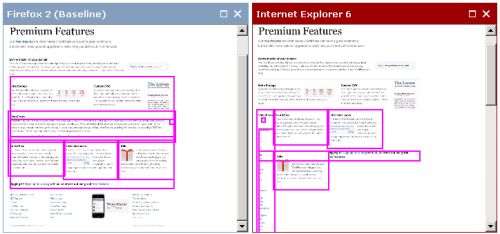
<p>Most web developers are no longer supporting Firefox 2, since its market share has all but eroded away, but just in case someone has this problem in a different browser, I thought I&#8217;d mention it.  The site wizehive.com uses a very basic float style for their header and back links, however, in Firefox 2, the back link wraps to the next line.  Why?  After doing some digging, it turns out this is because of a <a href="http://www.webmasterworld.com/css/3811603.htm">change between the CSS 2 -&gt; CSS 2.1 standards.</a> CSS 2 required an explicit width, while CSS 2.1 automatically shrinks the container to fit it&#8217;s contents.  So, if you experience this in FF2, or any other browser, set an explicit width on that element to put it back in the right spot.</p>
]]></content:encoded>
			<wfw:commentRss>http://blog.browsera.com/?feed=rss2&amp;p=60</wfw:commentRss>
		</item>
		<item>
		<title>Layout Testing for Dynamic Content</title>
		<link>http://blog.browsera.com/?p=56</link>
		<comments>http://blog.browsera.com/?p=56#comments</comments>
		<pubDate>Mon, 15 Jun 2009 21:58:29 +0000</pubDate>
		<dc:creator>browsera</dc:creator>
		
		<category><![CDATA[Cross-Browser Bug Fixes]]></category>

		<category><![CDATA[cookpad]]></category>

		<category><![CDATA[float drop]]></category>

		<category><![CDATA[ugc]]></category>

		<guid isPermaLink="false">http://blog.xbdiff.com/?p=56</guid>
		<description><![CDATA[
A few days ago, a test against the home page for cookpad.com revealed a float drop error in Firefox 3, in their main promotion of a user recipe.  Since then, the recipe featured has changed, and thus the bug does not occur any longer.
But, this demonstrates an important point:  if your site features user-generated content, [...]]]></description>
			<content:encoded><![CDATA[<p><a href="http://www.browsera.com/web_pages/7060-no-1-"><img class="aligncenter size-full wp-image-57" title="cookpad_home" src="http://blog.xbdiff.com/wp-content/uploads/2009/06/cookpad_home.jpg" alt="cookpad_home" width="613" height="335" /></a></p>
<p>A few days ago, a <a href="http://www.browsera.com/web_pages/7060-no-1-">test against the home page for cookpad.com</a> revealed a float drop error in Firefox 3, in their main promotion of a user recipe.  Since then, the recipe featured has changed, and thus the bug does not occur any longer.</p>
<p>But, this demonstrates an important point:  if your site features user-generated content, you must be very strict with your presentation layout, because users may contribute content in shapes and sizes you never considered.</p>
<p>We believe this is one of Browsera&#8217;s core strengths, its ability to quickly validate hundreds of web pages and automatically detect problems.  Performing a test like this manually against a large number of web pages takes too long and is too error prone.</p>
]]></content:encoded>
			<wfw:commentRss>http://blog.browsera.com/?feed=rss2&amp;p=56</wfw:commentRss>
		</item>
	</channel>
</rss>